Sonixd-Redux
Sleep Timer
The sleep timer automatically stops playback after a set duration - useful for falling asleep to music.
Setting the timer
Click the clock icon in the player bar to open the sleep timer popup.
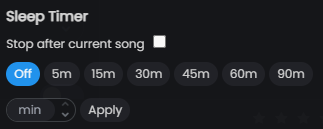
The popup has two sections:
Stop after current song
Tick Stop after current song to finish the currently playing track and then stop. This resets automatically once playback stops.
Timed stop
Choose a preset duration or enter a custom number of minutes:
| Preset | Duration |
|---|---|
| 5m | 5 minutes |
| 15m | 15 minutes |
| 30m | 30 minutes |
| 45m | 45 minutes |
| 60m | 1 hour |
| 90m | 90 minutes |
To set a custom duration, enter a number in the minutes field and click Apply.
While the timer is running, the remaining time is shown below the clock icon. Click the icon again and select Off to cancel.
When the timer reaches zero, playback pauses.